M Audio Firewire + MPC + Logic 8

BluPHI!!!

ILLIEN
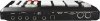
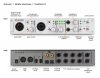
I just inherited an m audio firewire 410 from my GOD brother and I want to play the drum patterns that I create in my mpc 500 into a Logic track as audio through this interface.

I already installed the M audio's latest drivers for the 410 on my MacBook Pro but I dont know how to have my mpc 500 play into the Logic track as audio


Could anyone help me out. It would really mean alot.
 

Kontents

I like Gearslutz
Question

what are you hooking up and through what.

MPCAudio Out put (?) > to Maudio input(?) > Maudio Output (?)> to comp and into Logic.


Really just want to know what lines you are running your inputs to and what outputs.
 

Attachments

  • mpc.jpg
    mpc.jpg
    21.6 KB · Views: 208
  • Maudio.jpg
    Maudio.jpg
    84.9 KB · Views: 218

BluPHI!!!

ILLIEN
what are you hooking up and through what.

MPCAudio Out put (?) > to Maudio input(?) > Maudio Output (?)> to comp and into Logic.


Really just want to know what lines you are running your inputs to and what outputs.

Thanx for your peedy reply!

I using quarter inch plugs running out of my mpc 500 outputs (Or a "Y" shaped quarter inch plug running out of my headphone jack output ) into the 2 line inputs of the 410 interface.

I dont know what to select in the main arrange window of my Logic pro where It can have the audio playing into the track.

I hope this helps you understand my dilemma.
 

Kontents

I like Gearslutz
If I say no, is that bad??

Would I have to restart my mac and then try again??

Hmmm... well no, cause if the MPC is output to the input of the 410 that means that audio should be comming from the MPC to the Maudio device. then the output of the Maudio device to the comp should have audio.

We will look into that after we ensure Logic is set up for the Maudio interface to accept Input audio.

To open the Audio Devices preferences:
Choose Logic Pro > Preferences > Audio (or use the Open Audio Preferences key command), then click the Devices tab.

Click the Preferences Toolbar button; choose Audio from the pop-up menu, then click the Devices tab.
 
Top